Introducing Project Intelligence: Asa Now Surfaces Blockers, Risks, and Updates From Your Team's Conversations — Automatically

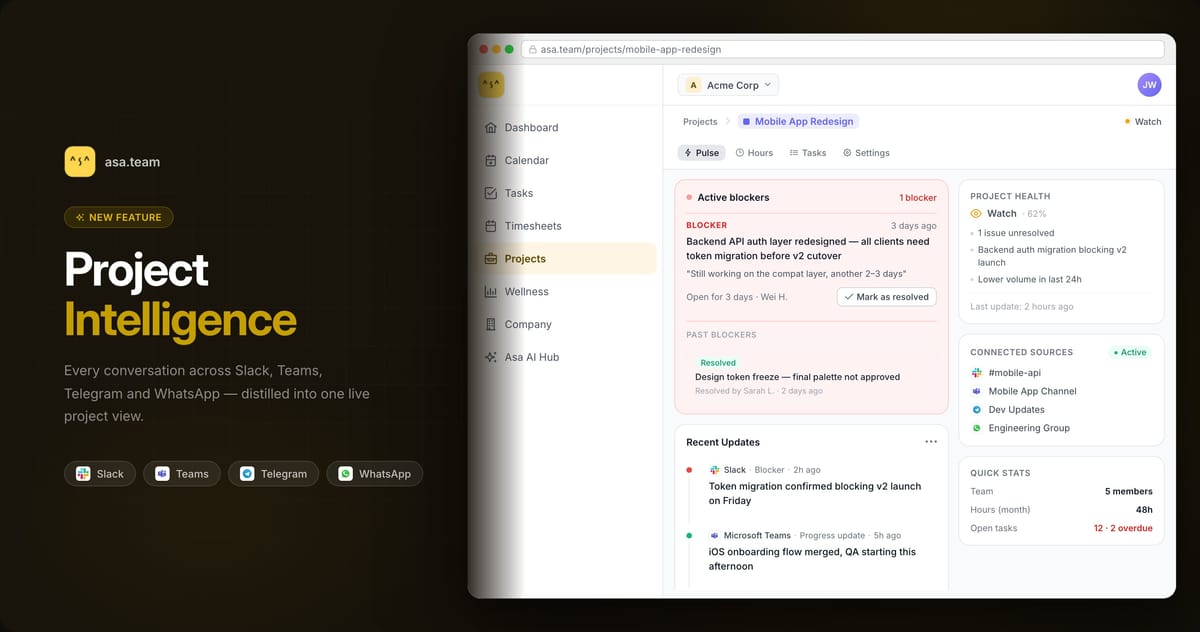
We built Project Intelligence because the information your team needs to move faster is already there — it's just buried in Slack threads, Teams chats, and Telegram groups that nobody has time to read in full.
Today, Project Intelligence is available to all users.
Connect a project to the conversations where your team actually works, and Asa will surface everything that matters — blockers, risks, decisions, progress — without anyone having to write a status update. And when you need a quick read on how a project is tracking, you can ask directly in Slack, Teams, Telegram, or WhatsApp without opening the app at all.
The problem with project visibility
Most teams don't have a communication problem. They have a signal extraction problem.
When a developer mentions in a Teams channel that they're waiting on vendor API documentation, that's a blocker. When a designer flags in Slack that the brief has changed scope, that's a risk. When someone posts "just shipped the auth refactor," that's a milestone worth noting.
None of these require a meeting or a formal update. They happen naturally, in the flow of work. But the people who need to act on them — project leads, admins, anyone coordinating across the team — have to be in the right channel at the right time to catch them.
When you're running multiple projects across four different chat groups, that's not realistic. Things get missed. Blockers go unaddressed. Risks surface too late.
How Project Intelligence works
You connect a project to the Slack channel, Teams chat, Telegram group, or WhatsApp thread where your team discusses it. Asa reads those conversations on a 24-hour cycle and extracts what matters as structured signals.
A signal is a clean summary of something real. When your backend team mentions in Slack that they're blocked on vendor API docs, Asa creates a blocker signal:
"Team is waiting on API documentation from vendor before backend work can proceed."
Not a copy of the message — a structured summary with the source conversation attached as evidence.
Signals are categorised by type:
| Signal type | What it captures |
|---|---|
| Blocker | Something actively stopping progress |
| Risk | A potential future problem flagged by the team |
| Decision made | A choice recorded for future reference |
| Progress update | Concrete work moved forward |
| Work completed | A task or feature marked done |
| Open question | An unresolved question that needs follow-up |
| Timeline / scope change | Dates or deliverables shifted |
| Incident | An issue or outage reported |
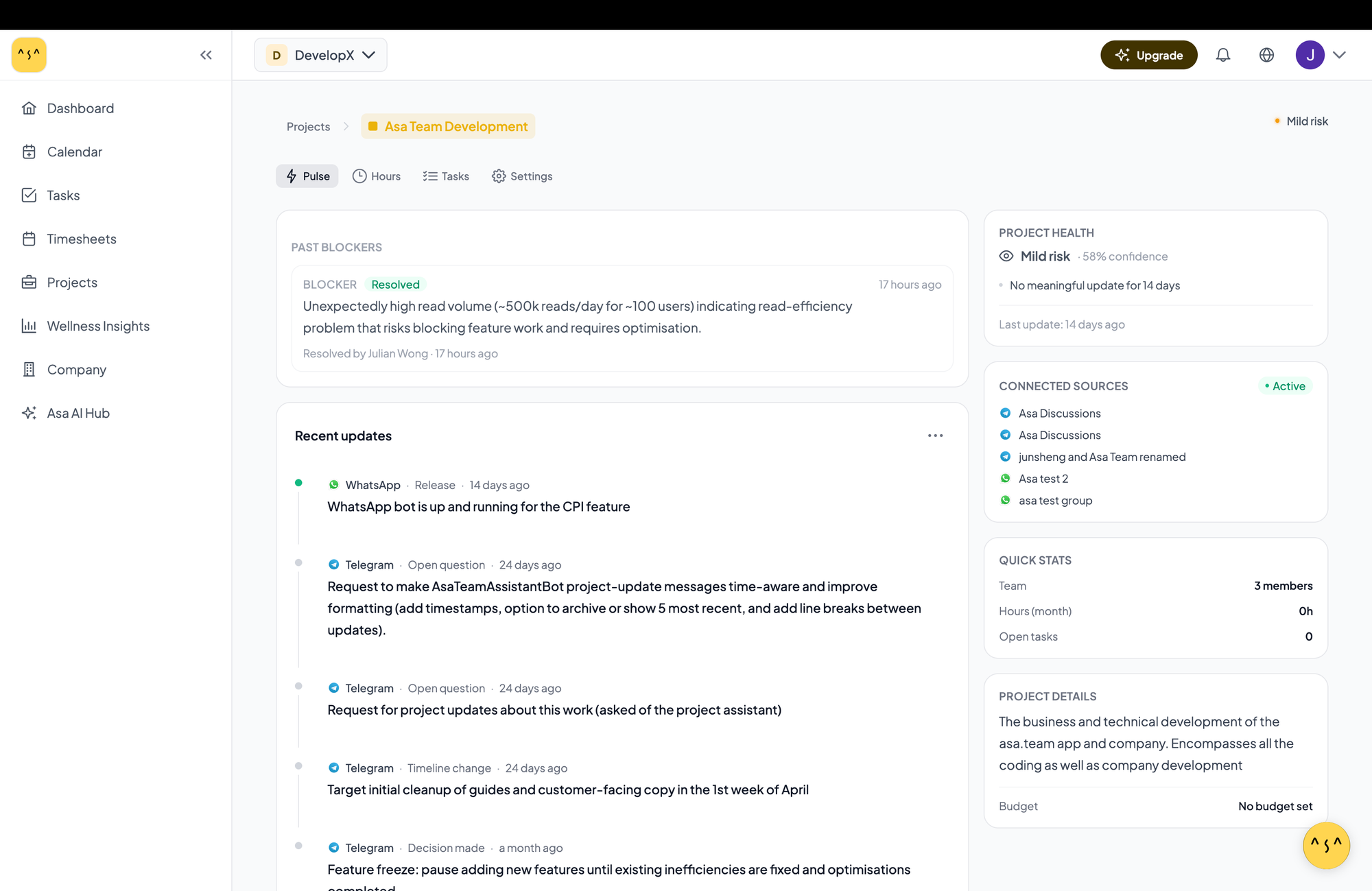
These appear in the Project Pulse tab — a live view of the project organised by signal type, with a health score at the top calculated from four factors: active blockers, momentum, inactivity, and signal confidence.
From scattered threads to one clear view
| Before | With Project Intelligence |
|---|---|
| Checking multiple channels every morning | One Pulse tab per project |
| Asking the team "is anything blocking you?" | Blockers surfaced automatically with context |
| Finding out about scope changes after the fact | Scope and timeline signals flagged as they happen |
| No record of what blocked the project last month | Full blocker log — active and resolved — in one place |
| Opening Asa to check on a project while you're on the go | Ask the Asa bot in Slack, Teams, or WhatsApp and get a live answer |
The blocker log is particularly useful for teams on longer timelines. Every blocker Asa has surfaced for a project lives in the Pulse view — active ones on top, resolved history below, with a record of who cleared each one and when.
Check in from wherever you are
Project Intelligence also works the other way.
If you're between meetings and want a quick read on a project, you don't need to open Asa. Ask the Asa bot directly in whichever platform you're already in:
"What's blocking the Mobile App project?"
"How is the Q3 launch project looking right now?"
You get a live answer back — health score, active blockers, and the most recent signals — straight in Slack, Teams, Telegram, or WhatsApp. No tab switching, no logging in.
For leads who spend their day in chat rather than dashboards, this is the part that sticks. Your project intelligence follows you instead of waiting for you to go looking for it.
Who gets the most out of it
Project leads and admins running multiple projects simultaneously get visibility without having to be present in every conversation. If you're across three or four active projects, Project Intelligence replaces the morning ritual of checking every channel to see what needs attention.
Distributed teams — where some people are on Slack, others on Teams, a few on Telegram — benefit from everything consolidated in one place. Asa reads across all connected sources and presents a unified picture.
New team members joining a project mid-stream can use the signal timeline to get up to speed without reading hundreds of messages of back-context.
Getting started
Open any project in Asa.Team and click the Pulse tab. If Project Intelligence isn't set up yet, you'll see the option to connect your first conversation source. Asa runs its first processing cycle and signals start appearing within 24 hours.
Project Intelligence is available on all plans (much higher limits on Growth, Scale, and Enterprise).
Your team's conversations already contain the answers. Now you can actually read them.