
7 Practical Ways to Build a Super‑Efficient Workday (Without Burning Out)


What does "efficiency" actually mean?
Most people equate efficiency with productivity—doing more tasks, faster. But real efficiency isn't about cramming more into your day. It's about removing friction so the work that matters happens with less cognitive load, fewer interruptions, and better outcomes.
The problem? We've built work cultures around constant availability, synchronous updates, and reactive firefighting. Every ping demands attention. Every meeting fragments focus. Every late start triggers guilt instead of adjustment.
The solution isn't another productivity app or time management framework. It's seven concrete practices that reduce friction at the system level—so your team can do their best work without burning out.
The framework: From reactive to intentional
These seven habits work together as a system. The first three establish boundaries and rhythm. The middle two create clarity without overhead. The last two add intelligent guardrails that catch problems early.
They're platform-agnostic—whether you use email, Teams, Slack, or simple timers. The first six are pure practice. The seventh shows how lightweight automation can lock them in.
1. Define your work window
The problem: When work hours are fuzzy, "just one more thing" bleeds into evening. Decision fatigue starts before you even begin.
The practice: Set clear start and stop times with a small grace period (10–15 minutes). This isn't about rigid clock-punching—it's about reducing daily renegotiation of when work begins and ends.
Consistency makes deep work easier to protect and helps your brain shift into "work mode" faster. If you consistently start late, that's data for adjusting your schedule, not a character flaw.
Try this: Block 9:00–6:00 on your calendar. Set a 10-minute "arrival" reminder. Track patterns for two weeks, then adjust.
2. Guard two focus blocks
The problem: "Urgent" drowns out "important." Your calendar fills with meetings, leaving no time for deep work.
The practice: Schedule two non-negotiable 50–90 minute focus blocks each day—one morning, one afternoon. During each block:
- Silence non-urgent notifications
- Prep one specific task you'll complete
- If 90 minutes feels daunting, start with 25/5 Pomodoros
These blocks are appointments with your own brain. Treat them as seriously as you'd treat a client meeting.
Try this: Create recurring "Focus AM" (10:00–11:30) and "Focus PM" (2:00–3:30) calendar blocks. Enable Do Not Disturb. Decline meetings that conflict.
3. Move status out of meetings

The problem: Status meetings consume hours but produce little value. Everyone waits for their 90 seconds while half the team multitasks.
The practice: Replace synchronous status updates with compact, asynchronous posts. A three-line daily summary—what shipped, current risks, blockers—keeps everyone aligned without stealing focus time.
Meetings should be for decisions, collaboration, and problem-solving. Status belongs in writing.
Try this: At day's end, post three lines:
- Shipped: Completed feature X, closed 3 support tickets
- Risks: Waiting on legal review (day 4)
- Blockers: Need design approval from @Sarah
4. Nudge by outcomes, not activity
The problem: Notification overload creates alert fatigue. Every comment, mention, and update demands immediate attention—even when it doesn't.
The practice: Set reminders only for outcomes that matter: approaching deadlines, unresolved blockers, dependencies on your work, or prolonged inactivity on critical tasks.
Never nudge for every micro-change. Your goal is to prevent dropped balls, not create constant interruption.
Try this: Use date-based nudges (T-48h, T-24h, overdue). Tag only the owner. Ignore activity that doesn't require action.
5. Make time visible, not judgmental

The problem: Time tracking feels like surveillance. People game the system or resent being watched.
The practice: Track hours and punctuality to improve planning, not police behavior. Share weekly aggregates—on-time percentage, common exceptions—to help the team understand patterns and adjust schedules accordingly.
The goal is system improvement, not individual shame. If someone's consistently late, maybe morning meetings don't work for them.
Try this: Export a weekly punctuality snapshot. Review trends in your retro: "We're 60% on-time for 9am starts—should we shift to 9:30?"
6. Watch wellness signals early
The problem: Burnout creeps in slowly, then hits suddenly. By the time someone raises their hand, they're already struggling.
The practice: Small dips compound: mood trending down, late nights clustering, fewer focus blocks completed. Surface these patterns privately and early, then adjust workload or re-sequence priorities.
This isn't about monitoring emotions—it's about catching stress before it becomes crisis.
Try this: Log a simple 1–5 mood rating once daily. If you hit three consecutive lows, lighten tomorrow's plan. If a teammate's pattern shifts, check in.
7. Bringing it together
A truly efficient workday looks deceptively simple: defined boundaries, protected focus, clear outcomes, smart nudges, and early warning signals.
Most teams can start with basic tools—calendar blocks, reminder systems, and async messaging will get you 80% of the benefit with zero budget.
But here's where manual systems break down: You forget to log mood. End-of-day summaries get skipped when meetings run late. Focus blocks disappear when someone books over them. Deadline nudges require someone to remember to send them.
The most sustainable approach? Automate the repeatable parts so they happen consistently, while keeping the human decisions human. This means:
- Auto-scheduling focus blocks and tracking work windows without manual entry
- Prompting for end-of-day summaries right when you need them
- Sending deadline reminders only to task owners at the right time
- Flagging wellness patterns privately before burnout hits
- Surfacing workload imbalances and blockers across projects
When these mechanics run automatically inside the tools your team already uses—Teams, Slack, your project management system—the friction disappears. You're not managing a productivity system anymore. You're just doing the work.
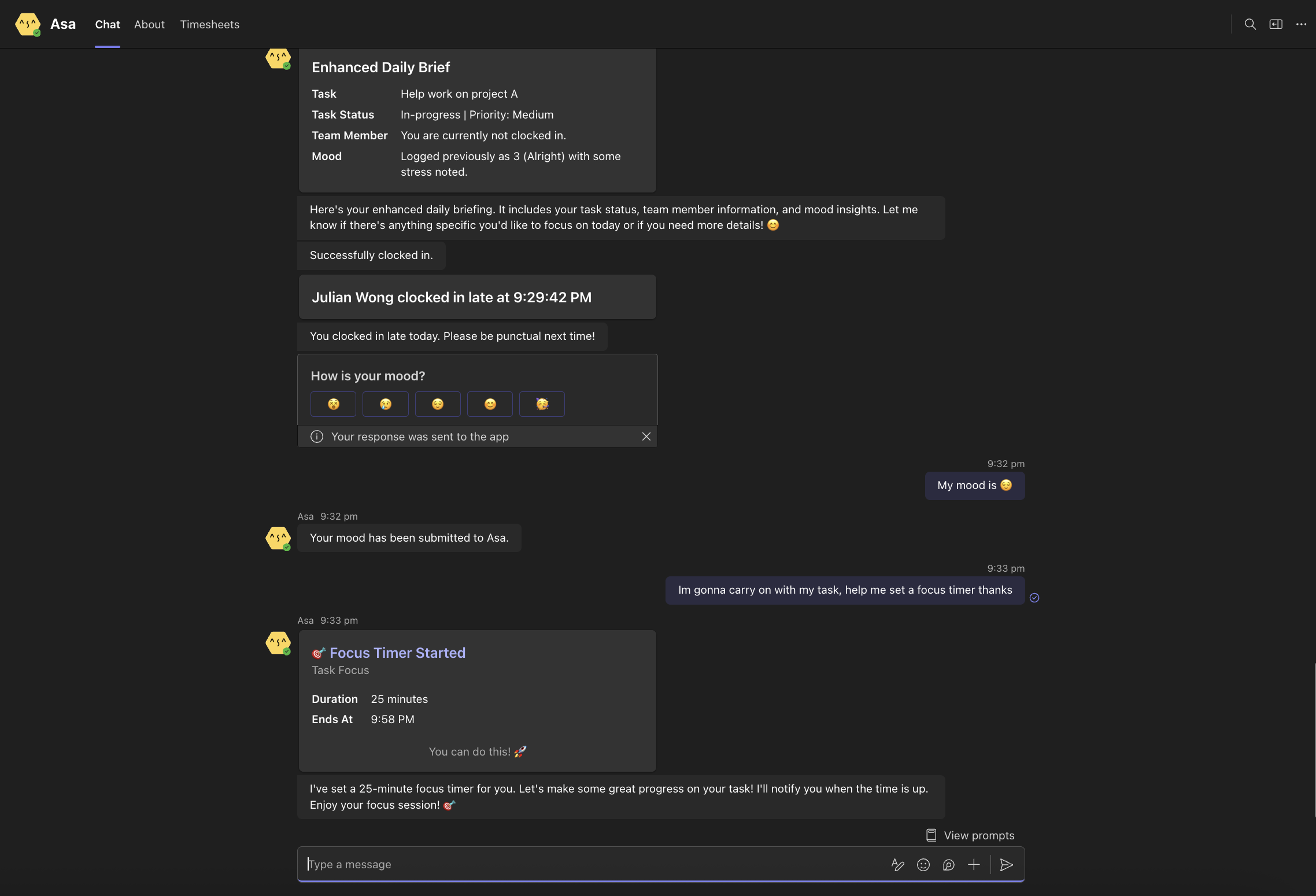
That's what Asa.Team does. It turns these seven habits into a consistent system that runs in the background, so your team can focus on work that actually requires thinking—not remembering to log, nudge, or track.
Ready to make these habits stick? Start with one or two practices manually. Once you see the value, explore how automation can help them run consistently without adding overhead.